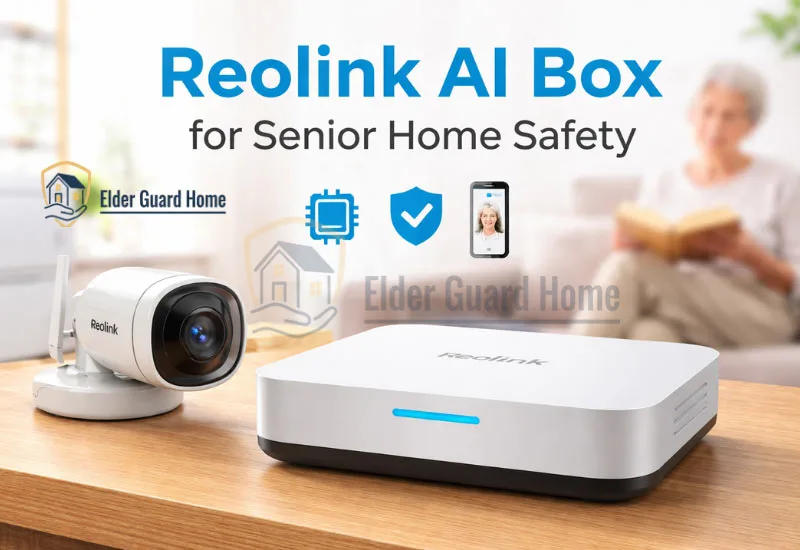
Home monitoring technology is evolving quickly. However, many families still struggle to balance safety, privacy, and ease of use. The Reolink AI Box for senior home safety is one such solution that promises intelligent camera-based monitoring without requiring wearable buttons.
While it is not a medical alert device, it can improve awareness inside the home. Therefore, it may suit households looking for smarter supervision rather than emergency response tools.
- The Reolink AI Box for senior home safety adds smart AI monitoring to compatible security cameras.
- It improves home awareness without requiring wearable buttons.
- However, it is not a medical-grade fall detection system.
- Instead, it provides real-time person detection and caregiver alerts.
- Many families ask, “Can this replace AI fall detection without wearables?” The short answer is no, but it can supplement it.
If you are exploring broader sensing technologies, especially systems designed specifically for fall events, you should also review our guide on AI fall detection without wearable buttons.
Understanding the difference between monitoring and true fall detection is essential before making a decision.
Reolink ai box price: No price declared yet.
Reolink AI Box availability: Not available to sell yet.
What Is the Reolink AI Box for fall detection?
The Reolink AI Box for fall detection is an edge-AI processing device that connects to compatible Reolink security cameras. It enhances those cameras with advanced person detection, smart alerts, and activity monitoring.
Instead of relying only on basic motion detection, the AI Box analyzes video footage locally. As a result, it can distinguish between people and general movement.
The device connects through your home network and pairs with supported cameras. Once configured, it processes footage in real time and sends alerts when specific activity rules are triggered.
Edge AI Processing Explained
Edge AI means data is processed locally on the device rather than in the cloud. Therefore, video analysis happens inside your home.
According to the U.S. Cybersecurity & Infrastructure Security Agency (CISA), minimizing cloud data exposure reduces certain security risks. Because of this, edge AI is often considered more privacy-friendly than cloud-only systems.
Why Edge AI Matters for Senior Privacy
Senior monitoring requires balance. On one hand, families need safety alerts. On the other hand, older adults deserve dignity.
Since edge AI limits unnecessary cloud uploads, it can reduce privacy concerns. However, remote access features may still use internet connectivity for notifications.
How Does Reolink AI Box Work for Senior Home Safety?
Reolink AI Box runs on ReoNeura AI technology.
It processes data directly on the device, not in the cloud.
This allows it to detect events, search footage, and connect smoothly with IPC, NVR, and HomeHub systems. It responds in real time.
The system enhances compatible cameras with intelligent activity recognition. Consequently, it can notify caregivers when unusual movement occurs.
Although it improves awareness, it does not replace medical alert systems. Instead, it acts as a smart security layer.
AI Person Detection for Elderly Monitoring
The AI engine distinguishes human figures from general motion. As a result, alerts triggered by pets, shadows, or moving curtains can be reduced.
For senior households, this means fewer unnecessary notifications. However, it does not interpret posture changes or body impact in a medical context.
Motion & Activity Zone Alerts
Users can define activity zones within camera views. Then, alerts trigger only when movement happens in those specific areas.
This is useful near staircases, hallways, or entry points. However, it does not automatically understand falls.
Real-Time Notifications to Family Members
When activity is detected, the system sends push notifications through the app. Therefore, caregivers can check in quickly.
Additionally, multiple family members can receive alerts simultaneously. That shared visibility can improve response time.
Works Without Wearable Buttons
Unlike traditional medical alert devices, the Reolink AI Box does not require seniors to wear pendants or press emergency buttons.
This makes it suitable AI home security for elderly who refuse wearable devices. However, because there is no active emergency trigger, it cannot replace manual alert systems entirely.
Can Reolink AI Box Detect Falls?
This is the most important question.
While the system uses AI person detection, it is not a certified medical fall detection device. Therefore, expectations must remain realistic.
Does Reolink AI Box Offer True Fall Detection?
No. The AI Box does not specifically detect body posture changes or impact events associated with falls.
Instead, it detects motion and presence. As a result, it may recognize unusual inactivity but not classify it as a fall.
Motion Detection vs Dedicated Fall Technology
Motion detection identifies movement. In contrast, AI fall detection systems analyze posture transitions, acceleration patterns, and sudden vertical drops.
For example, radar-based systems measure body positioning in 3D space. If you want to understand dedicated systems, read our guide on Non-wearable AI fall detection system.
That guide explains radar-based and non-camera alternatives designed specifically for fall scenarios.
When It May Miss a Fall Event
If a senior falls outside the camera’s field of view, the system will not detect it. Likewise, if a fall happens slowly and ends without visible motion, alerts may not trigger.
Therefore, the AI Box should be viewed as supplementary monitoring. It is not a replacement for specialized fall detection technology.
Reolink AI Box vs AI Fall Detection Systems Without Wearables
Choosing between smart camera monitoring and purpose-built fall detection depends on risk level. While both aim to improve safety, their technology and reliability differ significantly.
The Reolink AI Box enhances camera intelligence. Therefore, it improves awareness and reduces false motion alerts. However, it does not analyze body posture, impact force, or sudden vertical collapse.
In contrast, radar-based fall detection systems use non-visual sensors to track body movement in three-dimensional space. As a result, they can automatically identify a fall without requiring manual input.
Meanwhile, medical alert buttons rely on the user pressing a button. Consequently, they work only if the senior remains conscious and responsive.
If your priority is visual supervision and smart alerts, the AI Box may be sufficient. However, if automatic fall recognition is critical, dedicated sensing systems offer stronger reliability.
Below is a simplified comparison for clarity:
| Feature | Reolink AI Box | Radar AI Fall Detection | Medical Alert Buttons |
|---|---|---|---|
| Automatic Fall Detection | No (motion/person detection only) | Yes (posture + impact analysis) | No (manual press required) |
| Wearable Required | No | No | Yes |
| Camera Required | Yes | No | No |
| Privacy Level | Moderate (camera-based) | High (no video) | High |
| Best For | Smart home awareness | High fall-risk seniors | Emergency-trigger support |
Therefore, the Reolink AI Box improves awareness. However, radar-based systems provide stronger fall detection reliability.
Smart AI Home Monitoring Without Smartphone – Is It Possible?
Many families worry about smartphone dependence. However, in most setups, seniors do not need to operate the app directly.
The Reolink AI Box requires initial configuration through a caregiver’s device. After setup, monitoring runs automatically. Therefore, the older adult does not need to manage notifications.
Can Seniors Use It Without a Smartphone?
Yes, because caregivers receive the alerts. Seniors can live normally without interacting with the system.
This makes it suitable for households where older adults resist technology. However, it does require someone else to manage remote access.
How Caregivers Receive Alerts
Push notifications are sent when defined activity occurs. Additionally, live camera access allows caregivers to verify situations instantly. Caregivers receive push notifications through the mobile app. Additionally, they can log in remotely to view live footage.
If smartphone use is a major concern, read our full guide: Monitor senior refuses smartphone.
Remote Monitoring Setup
The AI Box connects to compatible cameras and the home router. Then, caregiver accounts are added through the app.
After configuration, alerts operate automatically. Therefore, daily senior involvement is minimal.
Reolink AI Box as a Home Security System That Alerts Family Members
The device functions primarily as a smart home security enhancement.
- Push Alerts: When activity occurs in defined zones, instant alerts are sent. Therefore, families can check on unusual movement quickly.
- Remote Viewing: Caregivers can access live camera feeds. However, this requires internet connectivity.
- Alert Customization: Users can adjust sensitivity and define alert schedules. As a result, nighttime monitoring can be prioritized.
- Multi-User Access: Multiple family members can receive alerts simultaneously. Consequently, monitoring responsibility can be shared.
For broader system comparisons, see our guide on Home security system that alerts family members.
Privacy and Edge AI Monitoring for Seniors
Privacy concerns are valid. Therefore, understanding how data is processed is essential.
Edge AI processes video locally instead of sending all footage to cloud servers. As a result, exposure risks may decrease.
According to the National Institute of Standards and Technology (NIST), reducing unnecessary data transmission can improve cybersecurity posture.
Basic AI analysis happens locally. However, remote viewing and alerts require internet access.
Therefore, while processing is local, connectivity still plays a role.
Users can define privacy masks within camera views. Consequently, sensitive areas can be excluded from recording.
Still, because cameras are involved, some seniors may prefer non-camera solutions.
Pros and Cons of Reolink AI Box for Senior Home Safety
Every safety tool has trade-offs. Therefore, evaluating strengths and weaknesses clearly helps decision-making.
✅ Pros
No wearable device required
Improves camera-based alert accuracy
Multi-user caregiver access
Local AI processing enhances privacy
Custom activity zones
❌ Cons
Not true automatic fall detection
Requires camera installation
Limited value in blind spots
Internet required for remote alerts
May trigger alerts for non-emergencies
Who Is Reolink AI Box Best For?
This solution works best for:
Seniors living independently with moderate fall risk
Families wanting visual confirmation before responding
Homes already using compatible Reolink cameras
Caregivers who prefer app-based alerts
However, it may not suit high-risk individuals who require automatic fall recognition.
Limitations of Reolink AI Box for Elder Safety
Although it enhances monitoring, it has structural limits.
First, it cannot interpret posture collapse in a medical context. Therefore, it may miss certain fall scenarios.
Second, camera positioning affects effectiveness. If key areas are not covered, events may go undetected.
It may also fall short for seniors with dementia who are prone to wandering. While it can send alerts when movement is detected, it does not provide structured wandering prevention or real-time medical response.
Bathrooms present another limitation. Steam, privacy concerns, and compact layouts make camera-based monitoring unreliable. In these cases, a dedicated bathroom fall detection system for elderly adults is often a safer solution. (You can link this phrase to your bathroom fall detection article.)
Finally, response depends on caregivers seeing notifications quickly. Unlike emergency call systems, it does not automatically contact medical services.
For high fall-risk seniors, dedicated sensing systems provide stronger protection.
Choosing the right system depends on risk level — not just convenience.
How to Set Up Reolink AI Box for Senior Home Safety
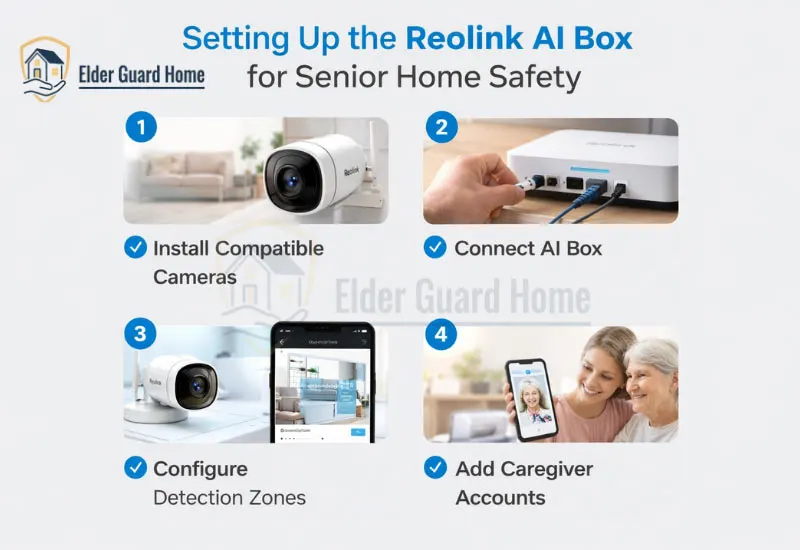
Setting up the Reolink AI Box for senior home safety requires careful placement and thoughtful configuration. While installation is straightforward, proper setup determines effectiveness.
Follow these steps for optimal results:
1. Install Compatible Cameras
First, install supported Reolink cameras in key areas such as hallways, living rooms, and entryways. Avoid placing cameras in private spaces unless consent and privacy considerations are addressed. Proper angle and lighting significantly improve detection accuracy.
2. Connect the AI Box
Next, connect the AI Box to your home router using Ethernet. Then, link it to the installed cameras through the Reolink app. This allows local AI processing to begin immediately.
3. Configure Detection Zones
After connection, define activity zones inside the camera view. For example, mark staircases or walking paths as priority areas. Consequently, alerts become more relevant and less disruptive.
4. Add Caregiver Accounts
Now, add family members who should receive notifications. Multi-user access ensures shared monitoring responsibility.
5. Test the Alert System
Finally, simulate movement in defined zones. Confirm that notifications arrive promptly. Testing reduces response delays later.
Proper setup transforms this device from a basic security add-on into a practical monitoring support system.
Check More detail about this product.
FAQ – Reolink AI Box for Senior Home Safety
Can Reolink AI Box detect falls?
No. The Reolink AI Box does not provide true fall detection. Instead, it identifies human movement and presence. While it may alert caregivers to unusual activity, it does not analyze posture changes, impact force, or vertical collapse patterns like dedicated fall detection systems.
Does Reolink AI Box work without wearable buttons?
Yes. The system does not require seniors to wear pendants or press emergency buttons. Instead, it relies on camera-based AI detection. However, because there is no manual emergency trigger, it cannot replace button-based alert systems entirely.
Can seniors use Reolink AI Box without a smartphone?
Yes, but caregivers must manage the app. Seniors do not need to operate a smartphone daily. Once configured, alerts go directly to family members. Therefore, it suits households where older adults avoid using technology.
Is Reolink AI Box private and secure?
The device uses edge AI processing, which means video analysis occurs locally. As a result, continuous cloud transmission is reduced. However, remote viewing and alerts still require internet connectivity, so privacy settings should be configured carefully.
Is Reolink AI Box better than medical alert systems?
It depends on your goal. For visual monitoring and smart alerts, it offers useful features. However, for emergency response and automatic fall detection, medical alert systems remain more reliable. Ideally, it should be viewed as a complementary safety tool.
Final Verdict: Reolink AI Box Review for Seniors Safety
After evaluating features, limitations, and real-world application, the Reolink ai box for senior home safety review is balanced.
The Reolink AI Box for senior home safety provides intelligent awareness but not medical-grade protection.
- Safety level: Moderate
- Fall detection accuracy: Limited
- Best use case: Supplementary monitoring
- Replacement for medical alert systems: No
It works well for families seeking smarter camera alerts. However, it does not replace automatic fall detection systems or emergency call devices.
If your primary concern is proactive fall identification, specialized systems remain stronger. On the other hand, if you want visual confirmation and activity monitoring, this device offers practical value.
In short, it enhances security awareness but should not be your only safety layer.