
If you are caring for an older parent, you already know this problem.
They refuse wearable devices.
They forget emergency buttons.
They remove them at night.
Falls are one of the most common and serious health risks for older adults. According to the Centers for Disease Control and Prevention (CDC), about 1 in 4 adults aged 65 and older fall each year, and falls are the leading cause of injury-related death and emergency room visits in this age group.
You may have tried medical alert pendants before. However, many seniors stop wearing them within weeks. Some feel uncomfortable. Others feel embarrassed. Many simply forget.
That is why caregivers are now searching for AI fall detection without wearable buttons.
These systems do not rely on seniors pressing buttons. Instead, they use smart cameras, motion analysis, and artificial intelligence to detect falls automatically. The caregiver controls everything. The senior does nothing.
This guide explains which AI fall detection systems work without wearable devices, how they function, and which options make sense in real homes—not labs.
Why Do Wearable Fall Detection Buttons Often Fail Seniors?
Wearable fall detection often fails because seniors forget to wear the device, remove it during bathing or sleep, or find it uncomfortable and intrusive. As a result, coverage drops exactly when falls occur most often.
Wearable fall detection buttons sound reliable on paper. In real life, they often fail.
Here are the most common reasons caregivers struggle with them.
Seniors Forget to Wear Them
Many older adults remove wearable buttons when sleeping, bathing, or changing clothes. Unfortunately, most falls happen during those exact moments.
If the device is not worn, it cannot help.
Real-world studies show that wearable fall detection systems often struggle with user compliance, as many older adults fail to wear them consistently throughout the day — causing missed alerts when they are needed most.
Devices Feel Medical and Intrusive
Some seniors associate emergency pendants with illness or loss of independence. They may feel watched or labeled as “fragile.”
As a result, resistance builds quickly.
Cognitive Decline Reduces Reliability
Seniors with memory loss may forget:
How the device works
When to charge it
When to press the button
In these cases, wearable fall detection without caregiver intervention becomes unreliable.
False Sense of Security for Families
Caregivers often believe a wearable device solves everything. However, when seniors stop wearing it, families may not realize the protection is gone.
This creates silent risk.
That is why fall detection without wearable devices is gaining attention.
On Monitoring Seniors Actually, many families struggle when a parent dislikes new technology. Indeed, you can monitor a senior who refuses to use a smartphone using these hidden methods.
Why do seniors refuse wearable fall detection devices?
Actually, many seniors refuse wearable devices. They feel these buttons represent a loss of independence. Charging batteries is also a daily chore they often forget. Many avoid them because they fear the social stigma.
What Is AI fall detection without wearable buttons?
AI fall detection systems without wearable buttons use sensors already installed in the home — such as cameras, motion detectors, and radar — to automatically identify falls without asking the person to press anything or wear a pendant.
Research shows that non-contact fall detection technology is highly effective. This includes radar and other advanced sensor systems. These systems can detect falls with high accuracy. They do not require seniors to wear any device.
AI fall detection without wearable buttons uses technology already inside the home. It does not require seniors to wear, press, or remember anything.
Instead, the system watches for abnormal movement patterns.
How Do AI Fall Detection Systems Work Without Wearable Buttons?
Most AI fall detection systems rely on one or more of the following for automatic fall detection for seniors:
Camera-based AI that detects body position changes
Motion sensors that track sudden collapse or inactivity
Behavioral AI that learns normal daily movement
When a fall-like event occurs, the system sends an alert to caregivers.
That improves comfort. It also increases long-term compliance and consistent use.
Why Caregivers Prefer This Approach
AI-based fall detection systems without wearable buttons offer key advantages:
No device for seniors to remember
No buttons to press during emergencies
No daily interaction required
Caregiver maintains full control
This is especially helpful for seniors who refuse technology or feel overwhelmed by medical devices.
Addressing the Privacy Concern
Modern camera-based fall detection for seniors does not work like security surveillance.
Many systems:
Use silhouette detection instead of facial detail
Analyze motion, not identity
Allow privacy zones in bedrooms or bathrooms
Research comparing different sensing technologies shows something important. Radar-based and silhouette-based fall detection systems don’t record identifiable video footage.
Instead, they focus only on movement patterns. This helps protect privacy while still detecting serious falls — which is a major concern for both seniors and caregivers.
This balance allows passive safety without constant monitoring.
On Smart Home Security Specifically, you can create a safer home by choosing the right hardware. Moreover, the best home security systems for seniors living alone provide extra protection without complex buttons.
Can AI Really Detect Falls Without Wearable Buttons?
Yes — modern AI systems can detect falls by analyzing motion, posture changes, and sudden inactivity using ambient sensors like radar or computer vision, eliminating the need for wearable devices.
Actually, fall detection can work perfectly without any wearable devices.
Modern systems use smart ambient sensors to monitor the home. These devices often use radar, smart motion sensors or AI-driven cameras to track motion.
They can detect a sudden drop in height or a heavy impact. This technology works in the background without needing a button.
It protects seniors while they are bathing or sleeping at night. These systems offer high accuracy and protect the user’s privacy.
How Does Camera-Based Fall Detection Work Without Wearable Buttons?
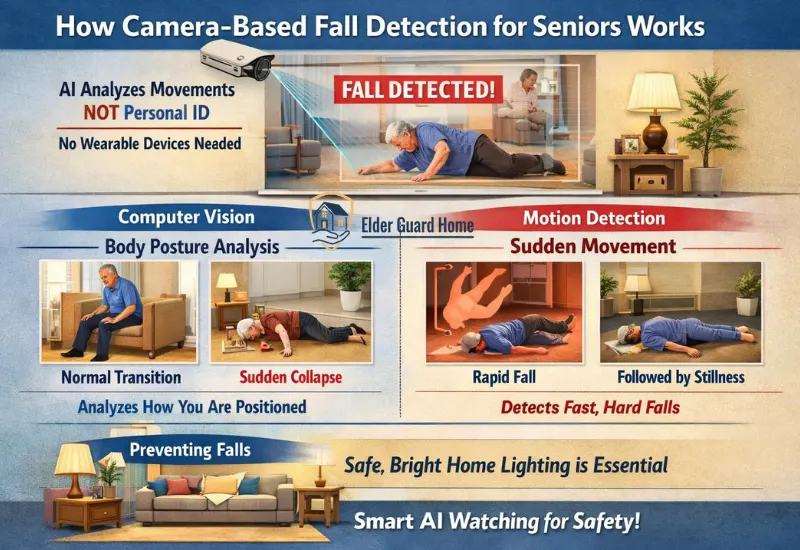
Camera-based fall detection for seniors uses artificial intelligence to recognize dangerous movements instead of relying on wearable buttons. The system watches how a person moves, not who they are.
Unlike traditional security cameras, these systems are trained to identify falls, not normal daily activity. Over time, the AI learns what is typical behavior and what signals a possible emergency.
This makes camera-based fall detection especially useful for seniors who forget devices or refuse to wear medical alerts.
1. Computer Vision vs Motion Detection
Not all fall detection cameras work the same way. Most systems use a combination of computer vision and motion detection, but their roles are different.
Body Posture Analysis
Computer vision focuses on body position.
The AI analyzes how a person is standing, sitting, or lying down.
For example:
- A slow transition from standing to sitting is normal
- A sudden horizontal collapse is not
This posture-based analysis helps reduce false alarms.
Fall detection research widely recognizes that combining posture analysis with motion thresholds enhances detection accuracy. Fall events are typically identified by sudden postural change plus rapid loss of stability.
Sudden Movement Detection
Motion detection looks at speed and force.
If the system detects a rapid downward movement followed by stillness, it may flag a fall.
This layer is important because many falls happen quickly and without warning.
On Preventing Falls Actually, proper lighting is just as important as AI sensors. Indeed, you should follow a safe home lighting design for seniors to stop falls before they happen.
AI Learning Normal Behavior
Over time, AI fall detection systems learn patterns.
They recognize:
- Usual walking paths
- Normal sleep schedules
- Daily activity levels
Because of this, the system becomes more accurate. It understands the difference between resting on the couch and collapsing unexpectedly.
This adaptive learning is a key reason camera-based fall detection for seniors performs better than basic motion alerts.
2. Privacy-Safe AI Monitoring
Privacy is one of the biggest concerns caregivers have. Fortunately, many modern systems are designed with dignity in mind.
No Video Storage (Some Systems)
Some AI fall detection systems do not store video at all.
They analyze movement in real time and discard footage immediately.
This reduces long-term privacy risks and data exposure.
Silhouette Detection
Instead of recording detailed images, many systems convert people into silhouettes or outlines.
The AI tracks movement shape, not facial features.
This allows accurate fall detection without creating identifiable video.
Zones and Activity Masking
Caregivers can define privacy zones.
For example:
Bathroom areas can be masked
Bedrooms can be partially restricted
Specific areas can be excluded entirely
This customization makes camera-based fall detection feel less invasive.
Are camera fall detection systems private?
Yes. Many camera-based fall detection systems use silhouette detection, real-time analysis, and privacy zones to protect senior dignity while still detecting emergencies.
Types Of AI Fall Detection Systems Without Wearable Devices
Not all non-wearable fall detection solutions work the same way.
Some rely on computer vision. Others use behavioral tracking or radar sensing.
Choosing the right type reduces false alerts and improves real-world safety.
Quick Comparison — Types Of AI Fall Detection Systems
Below is a quick comparison of fall detection systems that work without wearable buttons, showing detection type, privacy level, and best use cases.
| Technology Type | Wearable Required | Privacy Level | Accuracy Level | Best For |
|---|---|---|---|---|
| Camera-Based AI | No | Medium | Moderate | Budget setups, shared spaces |
| Smart Motion AI | No | Medium | Moderate | Active seniors, behavior tracking |
| Radar-Based AI | No | High | High | Memory issues, bathrooms, bedrooms |
AI Motion + Activity Detection Cameras
AI Motion detection cameras use AI-powered activity recognition to monitor movement patterns. While not built exclusively for fall detection, they are widely used by caregivers for passive safety monitoring.
Here are key advantages of this approach:
Best for:
Seniors who refuse wearable devices
Families who already use smart home devices
Seniors comfortable with cameras in shared spaces.
Pros:
Works without senior input
Learns daily activity patterns
Strong caregiver app controls
Integrates with other smart home devices
Visual confirmation of incidents
Affordable entry point
Cons:
Not medical-grade fall detection
Requires internet connection
Can trigger false alerts from pets or lighting changes
Privacy concerns in bedrooms/bathrooms
Who should use this:
Caregivers who want simple, non-intrusive monitoring and already trust the ecosystem.
Smart Motion AI (Ring Cameras with Smart Motion Rules)
Ring cameras allow caregivers to create advanced motion rules and inactivity alerts. These features help identify unusual patterns, including possible falls.
Here are key advantages of this approach:
Best for:
Caregivers who want customizable alerts
Homes needing both safety and security
- Active seniors where pattern monitoring matters more than instant detection
Pros:
Motion + inactivity alerts
Easy installation
Strong notification system
Works well across multiple rooms
Custom alert rules
Good for tracking behavior changes
Cons:
Requires setup time for rules
Video-based (privacy settings needed)
Detects inactivity, not always confirmed falls
Requires setup tuning
Who should use this:
Families who want flexible monitoring and already use Ring or Amazon smart devices.
Radar-Based Fall Detection (Next-Gen AI)
Radar-based fall detection is one of the newest technologies available. Instead of cameras, it uses low-energy radar waves to detect movement and collapse.
Here are key advantages of this approach:
Best for:
Seniors with strong privacy concerns
Bedrooms and bathrooms
- Seniors with dementia, memory issues, or bathroom safety concerns
Pros:
No camera required
Detects presence and sudden collapse
Works in darkness
Extremely privacy-friendly
Cons:
Limited product availability
Higher cost
Newer technology
Who should use this:
Caregivers seeking advanced fall detection without cameras or wearables.
Why These Systems Matter
Smart home fall detection systems for elderly users are shifting away from buttons and wearables. Passive monitoring is more realistic for aging adults.
The goal is simple:
Detect falls early
Reduce caregiver anxiety
Preserve senior independence
Choosing the right system depends on comfort, privacy needs, and daily habits.
Best AI Fall Detection Systems Without Wearables (Top Picks by Category)
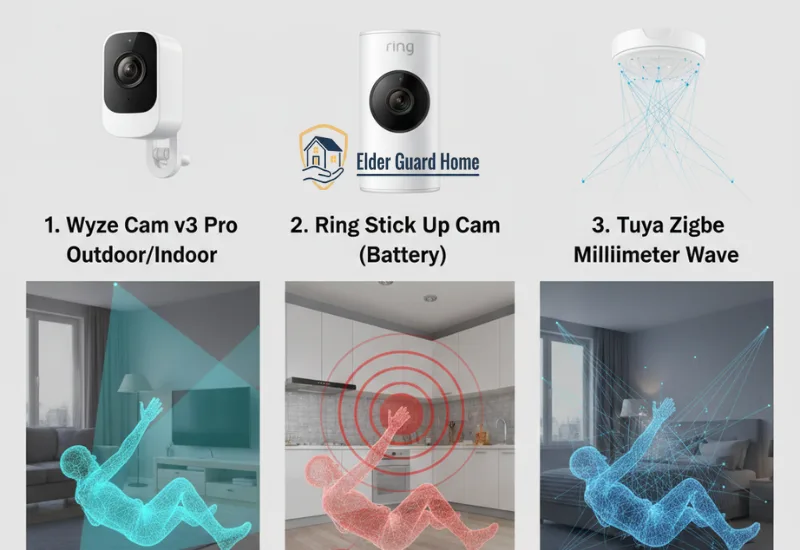
Not every system works well for every home. Below are the most practical smart home fall detection systems for elderly users that do not require wearable buttons.These options focus on passive monitoring and caregiver control.
Below are one best product per category, followed by detailed, individual reviews.
Comparison of AI Fall Detection Systems
| Product | Detection Type | Wearable Required | Camera/System | Privacy Level | Fall/Activity Alerts | Best For |
|---|---|---|---|---|---|---|
| Wyze Cam v3 Pro Outdoor/Indoor | AI motion & person detection | No | Camera | Medium (activity zones) | Yes (AI alerts) | Passive monitoring for seniors |
| Ring Stick Up Cam (Battery) | Motion + inactivity alerts | No | Camera | Medium (motion masking) | Yes (custom rules) | Custom smart home monitoring |
| Tuya Zigbee Millimeter Wave Human Fall Detection Sensor | Radar-based fall detection | No | Radar Sensor | High (no video) | Yes (radar alerts) | Privacy-first fall detection |
1. Wyze Cam v3 Pro Outdoor/Indoor (AI Motion + Person Detection)
This camera is one of the best alternatives for camera-based fall detection monitoring that doesn’t require wearable buttons and integrates well with caregiver workflows.
Product Type:
AI-enabled smart camera with advanced motion detection
How It Helps Seniors:
Wyze Cam v3 Pro uses AI motion and person detection to monitor unusual movement patterns, including sudden inactivity or collapsed posture. It captures both audio and visual context, which helps caregivers spot potential fall events even without wearable devices.
Unlike traditional security cameras, this model lets you:
Set activity zones (reduce false alerts)
Respond to motion and inactivity
Track patterns through AI learning
All without relying on the senior to push a button.
Key Features
1080p full-color night vision
AI person & vehicle detection
Motion alerts with customizable sensitivity
Works indoor or outdoor
Two-way audio (optional communication)
Works with Alexa, Google Assistant, and smart displays
Privacy Controls
Activity zones to exclude private areas
Time-based monitoring schedules
Optional cloud/local storage
Pros
Excellent value for performance
Works indoors and outdoors
Highly customizable alerts
Clear video + audio for context
Smart assistant integration
Cons
Not advertised as medical fall detection
Requires caregiver setup for optimal zones
Who Should Use This
Seniors comfortable with cameras
Caregivers who want scene context (not just alerts)
Families on a reasonable budget
On Camera Setup Specifically, setting up your tech correctly is vital for reliability. Thus, you should learn about setting up Wyze camera for elderly parents without a smartphone to improve visibility.
Wyze Cam v3 Pro — Best Camera-Based AI Monitoring
- AI motion + person alerts
- Full-color night vision
- Works indoors & outdoors
- Custom activity zones for privacy
2. Ring Stick Up Cam (Battery) - Motion + Alerts Based Smart Home Fall Detection System for Elderly
Why this wins:
Ring provides the best customizable motion + inactivity rule system for fall-related alerts in a smart home setup. Ring has both indoor cam and outdoor Stick Up Cam.
Product Type:
Smart home fall detection system for elderly (motion + inactivity logic)
How It Works:
Ring cameras allow caregivers to create:
Motion rules
Time-based inactivity alerts
Area-specific monitoring
This combination is extremely useful for detecting situations where a senior may have fallen and stopped moving.
Key Features:
Smart motion detection
Motion scheduling & zones
Inactivity alert logic (via routines)
Battery-powered (no wiring needed)
Alexa ecosystem integration
Privacy Controls:
Privacy zones
Motion masking
Camera disable schedule
Pros:
Easy setup
Works across multiple rooms
Strong alert customization
Excellent mobile notifications
Cons:
Requires setup effort for best results
Ring Protect subscription for history
Who Should Use This:
Caregivers managing multiple rooms
Homes already using Alexa
Families wanting flexible alert logic
If you are also using Ring doorbell to track safety at home, check our guide on How to Install Ring Doorbell Without Drilling.
Ring Stick Up Cam — Best Smart Home Fall Alert System
- Motion + inactivity alerts
- Easy DIY setup
- Multi-room coverage
3. Tuya Zigbee Millimeter Wave Human Fall Detection Sensor - Best No-Camera, No-Wearable Fall Detection
Why This Product Works
This sensor uses 60 GHz millimeter-wave radar tech combined with smart Wi-Fi/Zigbee connectivity, making it one of the best AI fall detection systems without wearable buttons. Because it integrates with Tuya or Smart Life apps, caregivers get real-time alerts directly on their phones.
Benefits
24/7 non-camera monitoring using radar
Instant fall alarms via app
Works with popular smart home ecosystems
Continuous detection without batteries or wearable buttons
Pros
Affordable compared to hospital systems
Easy setup with smart home platforms
Real-time fall alerts reach caregivers quickly
Cons
Works best with Tuya hubs or compatible smart systems
User must configure alert actions manually
Who Should Use This
Families wanting smart home fall detection with remote alerting, but still without wearable buttons or cameras.
Tuya Zigbee Millimeter Wave Human Fall Detection Sensor
- Radar-enabled fall detection without cameras
- Wi-Fi & Zigbee connectivity for app alerts
- Works 24/7 without senior interaction
- Integrates with smart home scenes
Best Overall Pick — The Most Balanced AI Fall Detection Without Wearables
Tuya Zigbee Fall Detection Sensor
After comparing all major approaches, Tuya Zigbee stands out as the best overall AI fall detection without wearable buttons for most senior households.
Why? It strikes the best balance between:
Accuracy
Privacy
Reliability
Long-term usability
Unlike camera-based solutions, it does not record video. Unlike medical alert buttons, it does not depend on memory or physical ability. The system uses advanced radar-based AI to detect real falls and prolonged immobility in real time.
Why this matters for caregivers:
In real emergencies, seniors often cannot press buttons, speak clearly, or even move. A non-wearable fall detection system that works silently in the background removes that risk entirely.
Best Overall For:
Seniors living alone
Seniors who refuse wearables
Families concerned about dignity and privacy
Long-term, low-maintenance safety monitoring
Which AI Fall Detection System Is Best for Different Senior Situations
Choosing the right fall detection setup isn’t about buying the “most advanced” system — it’s about matching the technology to the senior’s real-life situation. AI-powered monitoring works best when it fits daily habits, privacy needs, and cognitive ability.
Below is a simple, decision-friendly breakdown.
Seniors Living Alone
For seniors living alone, passive monitoring is critical. Systems that rely on the senior to press a button often fail in real emergencies.
The best option here is camera-based fall detection for seniors or radar-based systems that work continuously in the background. These systems analyze movement patterns, posture changes, and sudden inactivity without requiring any action from the senior.
Best choice:
Smart home fall detection systems for elderly that work automatically in the background.
Why it works:
No buttons to press during an emergency
AI detects unusual inactivity or sudden posture changes
Caregivers receive alerts even if the senior is unconscious
- Falls are detected even if the senior is unconscious
Recommended approach:
AI Camera-based fall detection for seniors placed in common areas like living rooms or hallways, combined with inactivity alerts.
This setup ensures help can be triggered even when the senior cannot act.
Seniors With Privacy Concerns
Privacy is one of the biggest barriers to adoption. Many seniors reject monitoring simply because they feel watched.
In this case, smart home fall detection systems for elderly users that do not record video are the safest choice. Radar-based AI systems detect presence, movement, and falls without capturing images or audio.
Key advantages:
No cameras, microphones, or recordings
No personal data stored as video
Dignity-preserving monitoring
For seniors who accept cameras, choosing systems with silhouette detection, activity zones, and no cloud video storage can also reduce privacy concerns significantly.
Best fit: Radar-based AI fall detection or privacy-first camera systems with strict controls.
For seniors who value independence, this balance makes AI fall detection acceptable and sustainable.
Seniors With Memory Issues
Seniors with dementia or memory challenges often forget to wear medical alert devices or charge them. This makes wearable-based systems unreliable.
Here, AI fall detection without wearable buttons becomes essential. These systems operate continuously and adapt to the senior’s normal behavior over time using machine learning.
Best choice:
AI fall detection systems without wearable buttons.
Why it works:
No need to remember charging, wearing, or pressing anything
Continuous monitoring without relying on routines
Caregivers stay in control of alerts and settings
Reduced caregiver stress
Automatic detection of unusual inactivity
AI systems can also identify behavior changes, such as reduced movement or irregular routines, which may signal health issues beyond falls.
Recommended approach:
Always-on camera or radar-based monitoring with automated alerts.
This removes cognitive burden from the senior entirely.
Night-Time Fall Risk
Night-time falls are among the most dangerous, especially during bathroom trips. Poor lighting, disorientation, and drowsiness increase risk significantly.
The best systems for this scenario combine:
Low-light or night vision detection
Inactivity alerts during unusual hours
Smart notifications if movement patterns change suddenly
Some camera-based systems can detect unusual nighttime activity, while radar-based solutions work regardless of lighting conditions.
Best choice:
AI systems optimized for low-light or no-light conditions.
Why it works:
Infrared or radar-based detection functions in darkness
Detects sudden collapses when seniors get up at night
Can be paired with motion-triggered night lights
Recommended approach:
AI systems placed along night-time movement paths (bedroom → bathroom), ideally with night visibility or radar sensing.
This dramatically reduces the risk of unnoticed overnight falls.
Comparison Verdict — Which non wearable fall detection system is Right for Your Home?
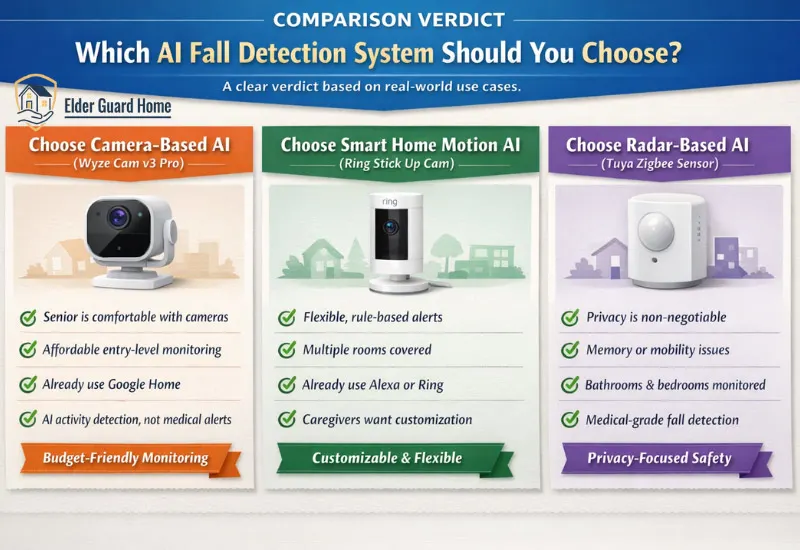
Not every home needs the same solution. Below is a clear verdict based on real-world use cases, not feature lists.
✅ Choose Camera-Based AI (Wyze Cam v3 Pro) If:
The senior is comfortable with cameras
You want affordable entry-level monitoring
You already use Google Home devices
You want AI activity detection, not medical-grade alerts
Camera-based fall detection for seniors works best when paired with clear privacy rules and limited placement.
✅ Choose Smart Home Motion AI (Ring Stick Up Cam) If:
You want flexible, rule-based alerts
Multiple rooms need coverage
You already use Alexa or Ring
Caregivers want customization over automation
This option works well for active seniors where pattern changes matter more than single fall events.
✅ Choose Radar-Based AI (Tuya Zigbee Sensor) If:
Privacy is non-negotiable
The senior has memory or mobility issues
Bathrooms and bedrooms need monitoring
You want the closest alternative to medical-grade fall detection
This is the strongest long-term solution for hands-off safety.
What AI Fall Detection Still Cannot Do? - Limitations
AI-powered monitoring is powerful, but it is not perfect. A transparent look at limitations builds trust and sets realistic expectations.
Here’s what AI fall detection systems still struggle with:
Internet dependency: Most systems require a stable internet connection for alerts and cloud-based AI processing.
Power outages: Without battery backup, monitoring stops during power failures.
False positives: Sudden sitting, dropping objects, or playful pets can occasionally trigger alerts.
Emergency response integration: Not all systems directly contact emergency services; many notify caregivers instead.
- Not Medical-Grade Devices: Most smart home systems are consumer electronics. They are not FDA-approved medical alert replacements.
- Placement Matters: Incorrect sensor placement can increase false positives or missed events. Bathrooms and staircases require careful positioning.
Because of these limitations, AI fall detection works best as part of a layered safety strategy, not as a single point of failure.
Ethical Monitoring — Fall Detection Without Violating Dignity
Learning how to monitor elderly parents remotely without harming trust is just as important as choosing the right technology.
Ethical monitoring focuses on safety and respect.
Best practices include:
Consent first: Always explain what is being monitored and why.
Least intrusive setup: Start with minimal coverage and expand only if needed.
Smart camera placement: Avoid bathrooms; focus on common areas and hallways.
Transparency: Let seniors know who receives alerts and when.
When seniors feel respected, they are far more likely to accept and benefit from AI monitoring.
Frequently Asked Questions
Can AI detect falls without wearable buttons?
Yes. Many modern systems use cameras or radar to detect falls automatically, without requiring the senior to press or wear anything.
What is the most accurate fall detection without wearables?
Radar-based AI systems are currently the most accurate and privacy-friendly, while advanced camera-based systems are a close second.
Are camera-based fall detection systems safe for seniors?
Yes, when privacy features like activity zones, no video storage, and caregiver-only access are enabled.
Do AI fall detection systems call emergency services automatically?
Some do, but many alert caregivers first. Emergency response depends on the provider and subscription plan.
Is AI fall detection better than medical alert buttons?
For seniors who forget or refuse wearables, AI-based systems are often more reliable than buttons.
Is radar fall detection better than camera-based systems?
Radar systems are more privacy-focused because they do not record video.
However, camera systems provide visual confirmation.
Final Verdict — Is AI Fall Detection Without Wearables Worth It?
There is no single “perfect” non-wearable fall detection system — but there is a right fit for every senior.
If you want:
Maximum privacy → choose radar-based AI
Lower cost entry → choose camera-based AI
Smart home flexibility → choose motion-based AI
The goal is not surveillance.
The goal is privacy-friendly fall detection.
For most modern households, AI fall detection without wearable buttons are absolutely worth considering. It removes user error, respects independence, and provides caregivers with real peace of mind.
The key is not choosing the most advanced system, but choosing the one that fits the senior’s habits, comfort level, and risks.
Start small. Monitor ethically. Adjust as needed.
When technology adapts to people — not the other way around — safety becomes sustainable.
Explore More About AI Fall Detection:
Radar vs Camera Fall Detection comparison
AI Fall Detection vs Medical Alert Buttons
False alarm rates in AI fall detection systems
Bathroom fall detection system for elderly
Reolink AI Box for Senior Home Safety
Pontosense Silver Shield Fall Detection for Seniors
AI fall prediction systems for seniors
Multi-Sensor Home Monitoring Systems
Fall detection vs home security system for seniors
Voice-Activated Emergency Alert System for Seniors