
Who This Guide Is For
This guide is written for:
- Caregivers researching a personal emergency response system for a parent living alone
- Seniors comparing in-home medical alert devices before a purchase decision
- Families weighing monthly cost against fall-detection features
- Anyone confused about whether Medicare covers a medical alert system
Caregivers ask me about in-home medical alert systems almost as often as they ask about grab bars. Usually it’s right after a parent has had a close call getting out of the shower. The two questions are more connected than people realize.
A senior with poor bathroom mobility also benefits most from a personal emergency response system near the tub. More than 14 million adults 65 and older, about one in four, report a fall each year in the U.S. That statistic alone is why this guide exists.
For a closer look at reducing fall risk at the source, see our bathroom fall prevention guide.
What Is an In-Home Medical Alert System
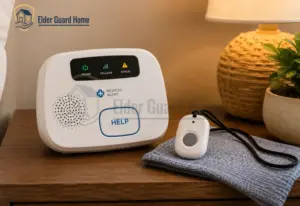
An in-home medical alert system is a base unit connected to a monitoring center, paired with a wearable button. One press of the button summons help.
The base unit plugs in near a phone jack or uses a cellular signal. The button itself works from anywhere in range of the home.
Most in-home medical alert devices use one of two connection types. Landline systems use the home’s existing phone line. Cellular systems connect through a built-in signal instead, which works even in homes without a landline.
Both types route the call to a live monitoring agent, not straight to 911. This matters for how quickly and accurately help gets dispatched.
| Component | What It Does |
|---|---|
| Base unit | Plugs in at home, connects to the monitoring center via landline or cellular signal |
| Wearable button | Worn as a pendant or wristband, triggers an alert from anywhere in range |
| Monitoring center | Live agents answer the alert, assess the situation, and dispatch help |
| Fall detection sensor | Optional add-on that auto-triggers an alert if a fall is detected, even without a button press |
How a Personal Emergency Response System Actually Works
The process starts the moment the wearable button is pressed, or a fall sensor triggers on its own. The base unit connects to a live agent within seconds. The agent then speaks directly through the base unit’s built-in speaker.
This two-way voice link is what separates a real personal emergency response system from a simple alarm. The agent assesses the situation, then decides whether to contact a family member, send a caregiver, or call 911.
Response speed varies by provider, with some averaging under 20 seconds and others closer to a minute. That gap matters more than most marketing pages admit, since every second counts during a fall.
Some systems now use AI-assisted fall detection to cut down false alarms while still catching genuine falls. This technology sits inside the pendant and detects the specific motion pattern of a fall.
See our guide on AI fall detection vs medical alert buttons for a deeper comparison of both approaches.
Types of Personal Emergency Response Devices
Not every personal emergency response device fits the same living situation. An in-home-only system covers the house and yard but stops working once someone leaves the property. A mobile or GPS-enabled system uses cellular data to work anywhere instead.
That mobile coverage matters most for seniors who still drive or walk outside regularly. A medical alert smartwatch blends both categories into one wearable, often adding step tracking and medication reminders.
Our bathroom fall detection guide covers non-wearable options for the room with the highest daily fall risk.
These tend to cost more, but they suit a senior who wants one device instead of two separate ones.
| System Type | Coverage Range | Best For |
|---|---|---|
| In-home only | Home and yard, typically up to 1,000 feet from the base unit | Seniors who rarely leave the house alone |
| Mobile / GPS | Anywhere with cellular coverage | Seniors who still drive, walk, or travel independently |
| Medical alert smartwatch | Anywhere with cellular coverage | Seniors who want one combined device with health tracking |
Choosing between these three comes down to how independent the senior’s daily routine still is, not age alone.
Matching the Right System to the Real Fall Risk

Most buying guides rank medical alert systems by star rating alone. As a certified senior home safety specialist, I think that misses the real question. The real question isn’t “what’s the best-rated system,” but “what does this person’s daily risk actually look like.”
A senior who lives alone with a recent fall needs different coverage than one with a spouse but poor bathroom mobility. The table below reflects the framework I walk caregivers through during a home safety consult.
It matches common real-world scenarios to the system type that actually covers the risk.
| Situation | Recommended System Type | Why |
|---|---|---|
| Lives alone, no recent falls | In-home system with fall detection add-on | Covers the most likely risk zone without paying for mobile coverage that goes unused |
| Lives alone, prior fall history | In-home system plus mobile backup button | Prior falls raise the chance of a repeat fall outside normal supervision hours |
| Lives with spouse, poor bathroom mobility | Waterproof pendant with in-home base | Bathroom falls often happen when a spouse is in another room and cannot hear a call for help |
| Still driving or walking outside daily | Mobile GPS system or medical alert smartwatch | In-home-only coverage offers no protection once the senior leaves the property |
| Mild cognitive decline, forgets to wear pendant | Medical alert smartwatch worn like a regular watch | Watches are less likely to be removed or forgotten than a separate pendant |
For seniors with cognitive decline, our guide to fall detection without wearable buttons covers passive monitoring alternatives.
Comparing the Top In-House Medical Alert Systems

Each of these four providers is widely recognized in the medical alert industry. They differ significantly on price, contract terms, and fall-detection availability. Bay Alarm Medical’s 2026 plans start at $27.95 per month with no long-term contract required. Medical Guardian’s systems run $31.95 to $46.95 per month, with fall detection costing an extra $10.
| Provider | Starting Monthly Cost | Fall Detection | Contract | Equipment Fee |
|---|---|---|---|---|
| Bay Alarm Medical | $27.95/mo | Available as add-on | None required | None on most plans |
| Medical Guardian | $31.95/mo | +$10/mo add-on | None required | $149.95 on entry plan |
| LifeFone | Varies by plan | Available as add-on | None required | None |
| Life Alert | $49.95/mo | Included on some plans | Multi-year agreement typical | Varies, confirm directly |
Confirm current pricing directly with each provider before publishing this comparison, since medical alert pricing shifts with seasonal promotions.
1. Bay alarm medical alert system
Bay Alarm Medical Alert System positions itself as the budget-friendly option without cutting corners on monitoring quality. Independent testing found Bay Alarm Medical’s average response time to be around 16 seconds, among the fastest in the industry.
Bay Alarm Medical is a California-based, family-owned company that has operated since 1946, and it positions itself as the budget-friendly option without cutting corners on monitoring quality.
The lineup includes four devices: the SOS Home base unit, the SOS All-In-One 2 for combined home and mobile coverage, the simplified SOS Micro wristband, and the SOS Smartwatch.
The SOS Home system works with either a landline or cellular connection and ships with a wearable pendant or wristband, plus extra wall-mounted buttons for the bathroom and kitchen.
Independent testing found the in-home system detected simulated falls within about 10 seconds when the optional fall-detection pendant was worn correctly.
Real-world in-home range sometimes fell short of the advertised 1,000 feet, so families with larger homes should test range carefully after setup.
Bay Alarm Medical Alert System’s Protection Plan adds a free annual equipment replacement and a 50 percent discount on accessories, and the company charges no cancellation fees. Pairing the pendant with wall-mounted buttons resembles the setups in our multi-sensor home monitoring guide.
Key features:
- No long-term contract on any plan
- Fall detection available as an add-on across the lineup
- Free wall-mounted help buttons included with the in-home system
- Recognized in Consumer Reports’ medical alert system coverage
Verdict: This is the strongest overall value pick for reliable coverage without a long-term commitment or high upfront cost.
✅ Pros: Lowest starting price, no contract required, fast average response time
❌ Cons: Fall detection costs extra on most plans
👤 Best For: Budget-conscious families who still want fast, reliable monitoring
2. Medical Guardian Medical Alert System
Medical Guardian Medical Alert System leans into higher-end features like a companion app, smartwatch options, and location tracking. These suit adult children managing care remotely. Testing found Medical Guardian’s average response time to be around 8 seconds, the fastest among major providers.
Medical Guardian offers the widest device lineup of the four providers here, with five distinct systems: MGHome Landline, MGHome Cellular, MGMini, MGMini Lite, and the MGMove smartwatch.
The MGHome Cellular claims the industry’s longest in-home range at 1,400 feet, which matters for seniors with large homes or big yards. The MGMove smartwatch stands out for going beyond a basic help button, adding step tracking, weather, and two-way messaging through the MyGuardian caregiver app.
Messaging and reminders cost an extra $5 per month on top of the base plan. The MyGuardian app itself is built with large text and simple navigation aimed at senior usability, and it lets caregivers check battery level and signal strength remotely.
The MyGuardian app’s remote check-ins pair well with our guide to security systems that alert family members. Equipment fees apply on most devices, at $149.95 for standard systems and $199.95 for the MGMove.
Key features:
- Five device options spanning landline, cellular, and smartwatch formats
- MyGuardian caregiver app included on most plans
- Fastest average confirmed response time among major providers
- Fall detection available for an extra $10 per month
Verdict: Worth the higher price for a caregiver app and the fastest confirmed response time on the market.
✅ Pros: Fastest average response time, strong caregiver app, no contract required
❌ Cons: Higher monthly cost, equipment fee on entry-level plan
👤 Best For: Adult children who want remote visibility into a parent’s safety status
3. lifefone medical alert system
Lifefone medical alert system stands out for caregiving extras beyond the emergency button itself, including scheduled wellness check-in calls. LifeFone offers remote caregiving services including daily check-in calls alongside standard monitoring.
LifeFone has offered medical alert monitoring since 1976, making it one of the longest-running providers in this comparison, with a call center in New York backed by additional U.S. monitoring centers. The company’s standout policy is pricing transparency: no equipment fees, no activation fees, and a 30-day money-back trial period on every plan.
LifeFone’s in-home base station offers a range of up to 1,300 feet, the longest advertised range among the four providers reviewed here. Fall detection costs only $5 per month, half of what most competitors charge, and the company states its fall-detection pendants catch roughly 95 percent of simulated falls in testing.
Beyond the emergency button, LifeFone also offers scheduled caregiver check-in calls and a lifetime price-lock guarantee, so the monthly rate won’t increase after signup. Couples get a second wearable pendant free, which is a meaningful saving for two-person households.
Key features:
- No equipment or activation fees on any plan
- 30-day free trial with money-back guarantee
- Fall detection at $5 per month, below industry average
- Free second pendant for couples living together
Verdict: A strong pick for families who want built-in check-in calls without paying for a separate wellness-call service.
✅ Pros: No equipment fees, includes check-in call options, no long-term contract
❌ Cons: Fewer smartwatch style options than Medical Guardian
👤 Best For: Families who also want scheduled wellness check-ins bundled in
4. life alert medical alert system
Life Alert is the most recognized brand in the category, built on decades of direct marketing. Life Alert’s basic in-home system costs $49.95 per month.
Life alert medical alert system is the most recognized name in this category, built on the “I’ve fallen and I can’t get up” campaign running since the late 1980s. Founded in 1987 in Encino, California, the company runs its own in-house monitoring center and reports handling over two million calls a year.
The lineup includes an in-home wearable button, a waterproof wall button for bathrooms, and a mobile GPS device. Life Alert does not currently offer automatic fall detection, a feature every other provider here includes at least as an add-on.
Pricing is not published online, and every subscriber signs a mandatory three-year contract. Combined in-home and mobile coverage runs close to $89.95 per month plus an activation fee near $198.
Key features:
- Decades of brand recognition and in-house monitoring
- No automatic fall detection currently offered
- Mandatory three-year contract on every plan
- Pricing not published; quote requires a phone call
Verdict: The brand recognition is real, but the higher price and multi-year agreement make it worth comparing first.
✅ Pros: Strong brand trust, long operating history, widely recognized by seniors themselves
❌ Cons: Higher monthly cost, contract terms are less flexible than competitors
👤 Best For: Seniors who want the most recognized name in the category
Hidden Costs and Contract Traps to Watch For
The advertised monthly price rarely tells the full story. Equipment fees, shipping charges, and fall-detection add-ons can push a $27.95 plan closer to $50 once every extra is included. Always ask for the total first-year cost in writing before signing up for any personal emergency response system.
Some providers use an introductory rate that increases after a set number of months. Always ask whether the quoted price is locked in or promotional. A cancellation policy matters just as much, since some contracts charge a fee for early cancellation.
| Hidden Cost | What to Ask |
|---|---|
| Equipment fee | Is this a one-time charge or does it repeat annually? |
| Fall detection add-on | Is this included in the base price or billed separately? |
| Shipping and activation | Is there a setup fee beyond the device cost? |
| Price-lock expiration | Does the rate increase after an introductory period? |
| Cancellation terms | Is there a penalty for canceling before a contract term ends? |
Does Medicare Cover in-home medical alert devices
Original Medicare does not cover in-home medical alert devices. Medicare Part B covers durable medical equipment only when a doctor orders it as medically necessary for home use. Medical alert systems are classified as convenience items instead.
Some Medicare Advantage plans offer partial coverage or a monthly allowance as a supplemental benefit. Coverage varies by plan and location, so check the plan’s Summary of Benefits or call the insurer directly to confirm.
Common Mistakes When Choosing an alert system for elderly in home
Many families buy based on brand recognition alone, without comparing response times or contract terms. Life Alert’s name recognition is real, but a faster, cheaper competitor may serve the same senior better. Compare the features that matter, not just the name on the box.
Another common mistake is skipping fall detection to save $10 a month. Some seniors can’t always press a button after a fall, which defeats the purpose. A third mistake is choosing an in-home-only system for someone who still drives or walks the neighborhood daily.
A fourth mistake is relying only on voice-activated emergency alerts instead of a dedicated system. These alerts work well as backup, but they require the senior to stay conscious and speak clearly. A dedicated wearable button does not share that limitation.
Frequently Asked Questions
Do in-home medical alert systems work during a power outage?
Most base units include a battery backup lasting 24 to 32 hours, though this varies by provider. Always confirm the exact duration before purchasing.
Is fall detection always accurate?
No system catches every fall with perfect accuracy, and our false alarm rate guide explains why. It greatly improves the odds of getting help when a senior can’t press the button. It should supplement fall-prevention steps, not replace them.
Can a personal emergency response system work without a landline?
Yes. Most major providers now offer cellular-based systems that work in any home with cell signal, regardless of landline service.
Does Medicaid cover medical alert systems
Some state Medicaid programs cover personal emergency response services under Home and Community-Based Services waivers. Coverage rules vary a lot by state.
What's the difference between an in-home system and a medical alert smartwatch?
An in-home system covers only the house and yard. A smartwatch works anywhere with cellular coverage and often adds health tracking features.
Conclusion
Choosing between in-home medical alert systems comes down to matching real daily risk to the right coverage type. Chasing the biggest brand name isn’t the same thing. I always tell caregivers to start with the fall-risk framework above before comparing prices.
The wrong system type can leave real gaps in coverage, even at a higher cost. For a full home safety plan, see our 9-point Senior Safety Checklist. You can also explore more of our Smart Tech and Monitoring guides for related coverage options.