
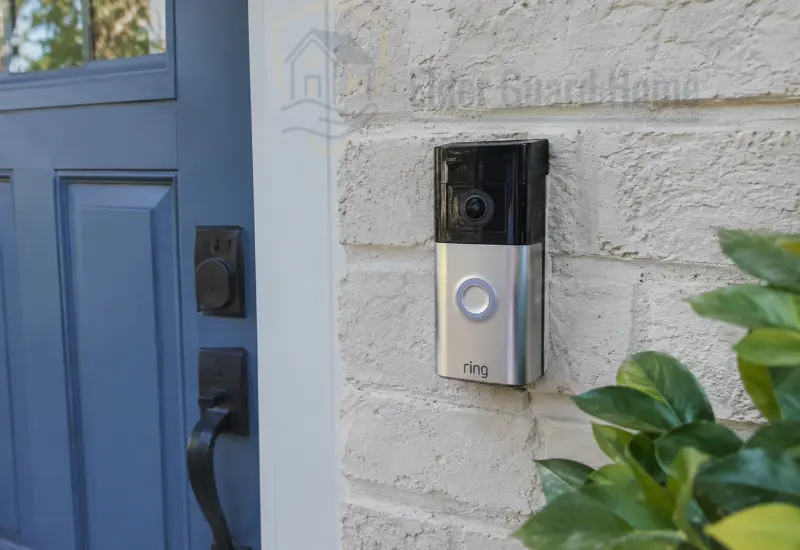
How to Install a Ring Doorbell Without Drilling
You can install some battery-powered Ring doorbells without drilling by using a compatible no-drill mount. The mount must support your exact model and attach securely to a suitable surface.
First, check your doorbell’s compatibility and the mounting surface. Prepare the area according to the manufacturer’s instructions, attach the mount, and secure the doorbell. Finally, complete the app setup and test the camera, notifications, and audio.
Important: Ring’s official adhesive mounts are intended for suitable, smooth surfaces. Do not install them directly on glass, rough brick, or rough stucco when the manufacturer’s instructions prohibit those surfaces. If no compatible no-drill method is available, consider another location or an appropriate conventional installation.
Can You Install a Ring Doorbell Without Drilling?
Yes, certain Ring battery-powered doorbells support no-drill installation with a compatible mounting accessory. However, the method depends on the specific doorbell generation and the surface where you plan to install it.
Ring offers adhesive-backed no-drill mounts for particular battery-powered models. Other options may include compatible door-edge brackets or mounting clips designed for specific doors and siding profiles.
Before choosing an option, check the manufacturer’s compatibility information. A mount advertised for one Ring doorbell may not fit another model.
You should also consider the installation location. A smooth painted surface may support an approved adhesive mount, while rough masonry may not.
For example, Ring’s official No-Drill Mount product page lists supported models and explains the product’s intended use.
Which Ring Doorbells Support No-Drill Installation?
Compatibility depends on the exact model and generation. Ring sells different mounting accessories for different battery doorbell families.
Some older battery-powered models have dedicated no-drill mounts. Newer models may require a different accessory.
Check the following before purchasing:
- Your Ring doorbell’s complete model name and generation.
- The exact mounting accessory and its supported devices.
- Whether the surface is suitable for adhesive attachment.
- Whether the doorbell’s weight and design are supported.
- Whether the mount allows the camera to face the required direction.
Do not assume that a mount will fit because its product listing mentions Ring Video Doorbell generally. Confirm the exact model in the manufacturer’s compatibility list.
When Is a No-Drill Installation Not Suitable?
A no-drill installation may not be appropriate when the surface is rough, unstable, dirty, or incompatible with the mounting product.
Avoid improvising with generic adhesive tape on brick, textured stucco, or glass. These surfaces can prevent proper attachment or create a safety risk.
A door-edge bracket may be another option if it fits the door securely. However, it must not interfere with closing, weather seals, or normal door operation.
If your chosen location cannot support a compatible mount, consider a different position. An approved installation using appropriate fixings may be safer than an unreliable no-drill workaround.
Choose the Right No-Drill Mount for Your Ring Doorbell
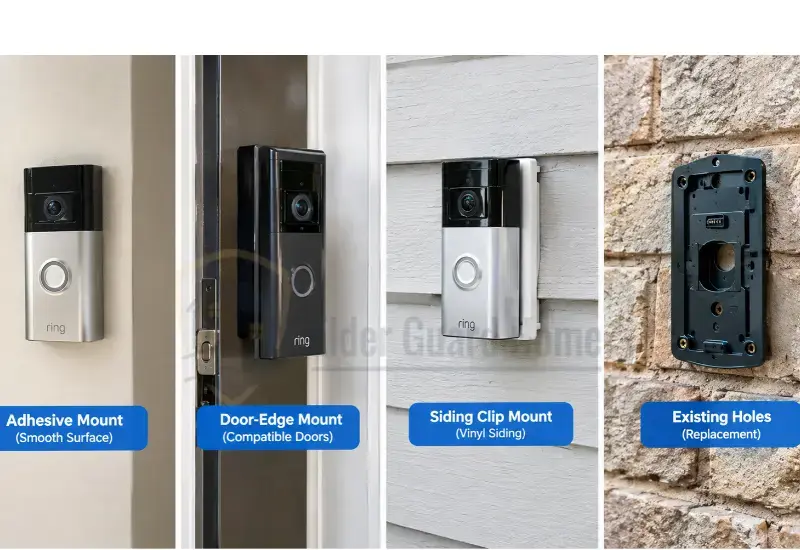
Choosing the correct mount is an important part of learning how to install a Ring doorbell without drilling. The best option depends on the doorbell, surface, door design, and installation restrictions.
Official Ring No-Drill Adhesive Mount
An official adhesive mount is designed to attach a compatible doorbell without drilling into the mounting surface.
This option can suit renters and homeowners who want to avoid permanent holes. However, you must choose the correct mount for your specific doorbell generation.
Ring’s instructions require a smooth, even mounting surface. They also warn against mounting the adhesive plate directly on glass and unsuitable rough surfaces.
Follow the included instructions for surface preparation, attachment pressure, and curing time. Do not substitute generic tape or assume every adhesive product offers equivalent performance.
Door-Edge or Anti-Theft Bracket
A door-edge bracket holds a compatible doorbell against a suitable door without drilling into the wall.
This option may help when the exterior wall is brick or stucco and the door itself offers a better mounting location.
Before buying one, check the door’s thickness and edge design. Confirm that the bracket fits securely and does not interfere with the latch, hinges, seals, or closing movement.
Also check whether the bracket is compatible with your Ring model. A bracket that fits one doorbell may not support another.
Vinyl Siding Mounting Clip
Some mounting clips are designed to fit specific vinyl siding profiles without creating new holes.
These accessories may work where the siding shape and doorbell placement are suitable. However, siding designs vary, and not every clip fits every exterior.
Check the product instructions before installation. Avoid forcing a clip into the siding or using it where the manufacturer does not recommend it.
Can You Reuse Existing Mounting Holes?
Reusing existing holes may avoid drilling additional ones when replacing an older doorbell.
However, the new doorbell’s bracket may have a different hole pattern. You might need a compatible adapter or mounting plate.
Check the existing holes for damage and confirm that the new mount can be secured properly. Do not rely on loose screws, damaged anchors, or an improvised adhesive attachment.
Compare the Main Mounting Options
The following table summarizes common mounting methods. Actual compatibility depends on the exact product and installation surface.
| Mounting Method | Best For | Surface Requirements | Main Limitation | What to Verify |
|---|---|---|---|---|
| Official adhesive mount | Suitable smooth surfaces | Flat, compatible surface | Not suitable for every exterior | Exact Ring model and surface guidance |
| Door-edge bracket | Compatible doors and rentals | Suitable door edge and clearance | May interfere with closing or seals | Door thickness, swing, and bracket fit |
| Vinyl siding clip | Compatible siding profiles | Suitable siding design | Not universal across siding types | Clip and doorbell compatibility |
| Existing mounting holes | Replacing an existing doorbell | Compatible holes and bracket | May require an adapter | Hole pattern and mounting instructions |
Check Your Door and Exterior Surface Before Buying a Mount
The surface matters as much as the mounting accessory. A mount that works on smooth trim may fail on rough masonry.
Inspect the proposed location before spending money. Look for loose paint, dust, moisture, uneven texture, and other conditions that could affect attachment.
While checking your entrance, look for slippery flooring and raised thresholds that could create trip hazards. Our guide to choosing safe flooring for seniors aging in place explains how flooring choices can support safer movement around the home.
Smooth Wood, Painted Trim, and Metal
Smooth, stable surfaces may be suitable for certain adhesive mounting products when the manufacturer’s instructions allow them.
Check that the paint is firmly attached and the surface is clean and dry. Loose paint can separate from the wall even when the adhesive itself remains intact.
Some metal surfaces may be suitable, but their finish, shape, and exposure conditions still matter. Follow the mount’s surface requirements rather than assuming all metal doors or frames are compatible.
If you rent, ask your landlord about restrictions before installing anything that could affect the finish.
How to Install a Ring Doorbell on Brick Without Drilling
Installing a Ring doorbell on brick without drilling can be difficult because brick surfaces are often uneven.
Ring’s official adhesive no-drill mount is not intended for rough brick. Generic heavy-duty tape is not a dependable substitute for an approved mounting method.
Consider these alternatives:
- Check whether a compatible door-edge bracket can position the doorbell securely.
- Look for a suitable smooth mounting surface beside the brick, provided the accessory allows it.
- Confirm that the chosen mount supports your model and intended position.
- If no safe no-drill option fits, consider an approved conventional installation.
Do not attach the doorbell to loose mortar or rely on an improvised clamp that has not been verified for the device.
A secure installation is more important than avoiding every hole. If drilling is necessary, follow the manufacturer’s instructions and obtain permission when required.
How to Install a Ring Doorbell on Stucco Without Drilling
Textured stucco creates a similar problem because adhesive may not contact enough of the surface evenly.
Ring advises against using its adhesive no-drill mount directly on rough stucco. Applying more tape does not make an unsuitable surface compatible.
First, check whether a compatible door-edge bracket or another approved mounting accessory can work at your entrance. A smooth adjacent trim surface may also be an option if the product instructions permit it.
Do not assume that every stucco finish is identical. Smooth trim and rough exterior stucco have different surface characteristics.
If no suitable alternative exists, an appropriate installation with proper fixings may be necessary.
Glass Doors, Storm Doors, and Metal Frames
Do not install Ring’s adhesive no-drill mount directly on glass when the manufacturer prohibits it.
A storm door may also create additional challenges. The doorbell could be blocked, exposed to repeated movement, or positioned too close to the main door.
If considering a metal frame, check its shape, surface finish, and available mounting space. Make sure the doorbell will not interfere with the door’s operation.
Choose a location that provides a useful camera view while keeping the device securely attached.
How to Install a Ring Doorbell Without Drilling Step by Step
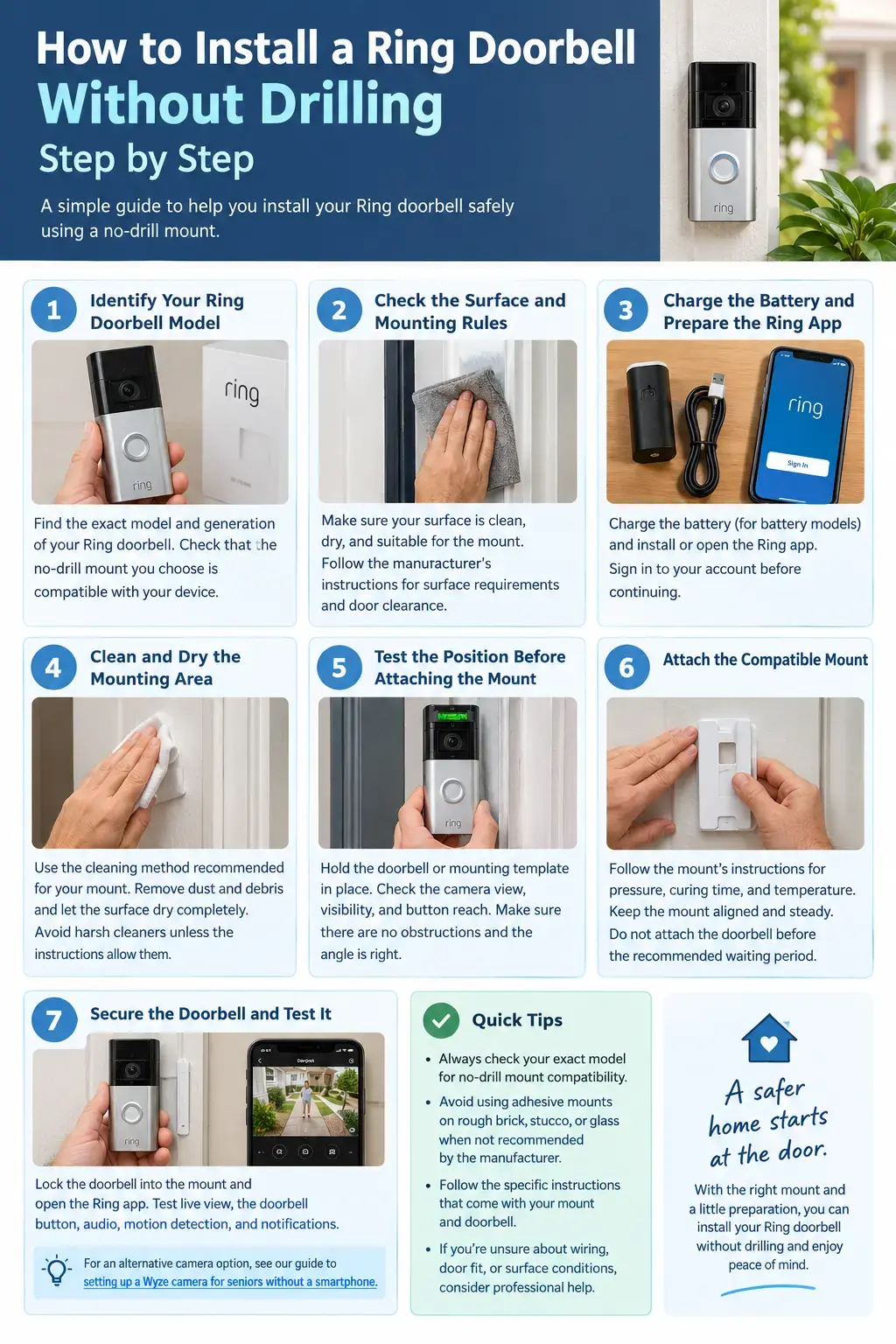
Once you have selected a compatible mount, follow the manufacturer’s instructions for your particular doorbell and mounting accessory.
The steps below cover a typical battery-powered doorbell using an approved adhesive mount. Other mounting systems may require a different procedure.
Step 1 — Identify Your Ring Doorbell Model
Find the complete model name and generation in your Ring account, device packaging, or product documentation.
Next, check the mount’s compatibility list. Do not purchase an accessory based only on appearance or a general claim that it fits Ring doorbells.
If the doorbell is wired, stop and check the model-specific mounting and wiring instructions. An adhesive accessory intended for a battery-powered model may not be suitable.
Step 2 — Check the Surface and Door Clearance
Inspect the installation area carefully.
Make sure the surface meets the mount manufacturer’s requirements. Check for loose paint, moisture, dust, uneven texture, and other problems.
If you are using a door-edge bracket, test whether the door can open and close without interference. Check the latch, frame, and weather seals.
Renters should also confirm that the chosen installation method complies with their lease.
Step 3 — Charge the Battery and Prepare the Ring App
For a battery-powered model, charge the battery according to the manufacturer’s instructions.
Install the Ring app on a compatible smartphone and sign in to your account. Follow the setup process for your particular doorbell.
Keep the device and account information available before mounting. This makes it easier to test the camera while the installation area remains accessible.
Step 4 — Clean and Dry the Mounting Area
Prepare the surface using the cleaning instructions supplied with the mount.
Remove dirt and loose debris. Allow the area to dry completely before attaching the adhesive plate.
Do not automatically use alcohol, solvents, or household cleaners. Some products can damage particular paints, finishes, or mounting surfaces.
If the surface is unsuitable, choose another mounting method rather than trying to improve it with stronger tape.
Step 5 — Test the Position Before Attaching the Mount
Hold the doorbell or mounting template in the proposed position before removing any adhesive backing.
Check whether the camera can see the entrance, approaching visitors, and the area where packages are left.
Look for obstructions such as door frames, plants, railings, and nearby walls. Consider glare from direct sunlight and reflections from glass.
For senior households, think about whether visitors can comfortably reach the doorbell and whether the camera view includes the approach to the entrance.
Step 6 — Attach the Compatible Mount
Follow the mounting instructions supplied with your exact product.
For example, Ring’s instructions for certain second-generation no-drill mounts specify holding the mount against the surface for five minutes and allowing an hour for adhesion. These timings are product-specific, not universal.
Keep the mount aligned while applying the required pressure. Do not attach the doorbell before the specified waiting period has passed.
If the mount shifts, lifts, or fails to adhere, stop. Remove or replace it according to the manufacturer’s instructions instead of adding unapproved tape.
Step 7 — Secure the Doorbell and Test It
Attach the doorbell using the method specified in its instructions. Confirm that it locks into place and does not move unexpectedly.
Open the Ring app and test the live view, doorbell button, motion detection, notifications, and two-way audio where available.
Walk through the camera’s field of view to check detection. Confirm that the intended caregiver receives alerts.
If anything fails, troubleshoot the app, Wi-Fi, battery, or settings before relying on the device for home monitoring.
For another approach to home entryway monitoring, see our guide to setting up a Wyze camera for seniors without a smartphone.
How to Set Up Ring Doorbell After Installation
Physical mounting and app setup are separate tasks. Your Ring doorbell needs to be configured and tested before you rely on it.
Connect the Doorbell to Wi-Fi
Follow the setup instructions for your exact Ring model.
If the device struggles to connect, check the Wi-Fi signal near the entrance. Thick exterior walls, distance from the router, and interference can affect connectivity.
Do not assume that a successful connection indoors guarantees reliable performance at the front door. Test the connection at the actual installation location.
Configure Motion Detection and Notifications
Open the Ring app and review the available motion settings.
Where supported, adjust motion zones and sensitivity to reduce unnecessary alerts. Avoid including areas that do not need monitoring.
Make sure the phone receiving alerts has the appropriate notification permissions enabled. The available features can vary by device and subscription.
A video doorbell helps monitor your entrance, but it does not replace a dedicated fall detection system. Families considering additional protection can learn about AI fall detection without wearable buttons.
Test Live View, Two-Way Audio, and Alerts
Open live view and confirm that the image is clear. Test the doorbell button and check whether notifications arrive promptly.
If your model supports two-way audio, test the microphone and speaker. Check the camera’s view at different times of day if lighting conditions change substantially.
Ask a trusted family member or caregiver to help if the senior needs assistance managing the app or notifications.
For accurate instructions, use the manufacturer’s Ring support and installation guides.
How to Install a Ring Doorbell Wired Without Drilling
A wired Ring doorbell requires additional care because the mounting method and electrical connections depend on the exact model.
The phrase “how to install Ring doorbell wired” can describe several different devices. Some models connect to existing doorbell wiring, while others have different power requirements.
Can You Reuse Existing Doorbell Holes?
Possibly. If an existing doorbell is being replaced, its mounting holes may align with the new bracket.
Check the hole pattern and the mounting instructions for your new device. An adapter may be needed if the holes do not align.
Do not rely on loose fixings or a bracket that cannot support the device securely. A no-drill approach should never compromise the stability of the installation.
Can a Wired Ring Doorbell Use an Adhesive Mount?
Do not assume that an adhesive mount designed for a battery-powered doorbell is suitable for a wired model.
Check the accessory’s supported-device list and the manufacturer’s instructions. The wiring arrangement, bracket design, and model-specific requirements must all be considered.
If the compatible mounting options require screws, you may need to choose another location or use a different approved installation method.
When Should You Call an Installer?
Get qualified help if you are unsure about existing wiring, transformer requirements, chime compatibility, or electrical safety.
Do not work on electrical connections without understanding the applicable safety requirements. Turn off power when required by the manufacturer’s instructions and applicable electrical rules.
Ring’s official battery-doorbell installation guidance explains that standard installation on brick, stucco, or concrete can require a masonry bit and wall anchors. That procedure is different from a no-drill installation.
How to Make Ring Doorbell Installation Easier for Seniors
A good installation should be secure, easy to maintain, and practical for the people using it.
Seniors have different abilities and preferences. The goal is to reduce unnecessary effort without sacrificing safety.
Choose a Comfortable and Accessible Installation Position
Test the proposed position before attaching the mount.
Consider whether visitors can reach the doorbell and whether the camera captures the approach clearly. Check the view from the places where the senior typically sits or spends time.
Avoid placing the device where the senior must stretch, bend awkwardly, or reach over obstacles to operate it.
Reduce Problems With Small Parts and Battery Charging
Some mounts require handling small screws or removing a faceplate. A caregiver can help if arthritis, reduced grip strength, or limited vision makes these tasks difficult.
For battery-powered models, establish a practical charging routine. Follow the manufacturer’s instructions for removing and charging the battery.
Do not leave charging equipment where it creates a trip hazard or blocks an entrance.
Avoid Ladders and Difficult Installation Positions
Do not ask a senior to climb a ladder or lean out of a doorway to install the camera.
Choose a reachable mounting position that still provides a useful view. If the best location is high, uneven, or difficult to reach, ask someone qualified to help.
Make Alerts Easier to Notice
Help the senior understand what happens when someone presses the doorbell or triggers motion detection.
Configure notifications on the intended devices and test them together. Explain how to open live view and speak to a visitor.
If the senior does not want to manage a smartphone, a trusted caregiver may help with ongoing access. Read our guide on how to monitor a senior who refuses to use a smartphone.
Common Ring Doorbell Installation Problems and Fixes
Even a compatible installation may need adjustments. Check the mounting hardware, network connection, and app settings before assuming the doorbell is faulty.
The Mount Feels Loose
Stop using a mount that moves, lifts, or separates from the surface.
Check whether the surface was compatible and properly prepared. Follow the product’s removal and reinstallation instructions.
Do not try to fix a failing mount with extra tape or an unapproved adhesive. Replace it with a compatible solution.
The Doorbell Will Not Connect to Wi-Fi
Check the network password, router settings, and signal strength at the entrance.
Restart the relevant equipment if the manufacturer’s troubleshooting instructions recommend it. If the signal is weak, consider an appropriate network improvement.
Confirm that the doorbell completes its setup process before relying on remote viewing.
Motion Alerts Are Missing
Review motion settings, detection zones, notification permissions, and the app’s configuration.
Check whether the camera is aimed at the area where movement occurs. Objects, walls, and incorrect positioning can limit detection.
Test the settings again after making adjustments.
The Battery Drains Too Quickly
Frequent activity, recording settings, temperature, and battery condition can affect battery life.
Review the settings available for your model and check the battery’s condition. Follow the manufacturer’s recommendations for charging and storage.
Do not assume that every model has the same battery performance.
The Doorbell View Is Poor
Check for glare, nearby obstructions, and an unsuitable mounting angle.
If your mount supports adjustment, use the approved method to improve the view. Do not loosen the bracket or alter the adhesive attachment in a way that compromises stability.
Test the new position in the Ring app.
How to Remove a No-Drill Ring Doorbell Mount Safely
A no-drill mount can still affect paint or exterior finishes during removal. The result depends on the adhesive, surface, age of the installation, and removal method.
Before starting, follow the manufacturer’s removal instructions.
Remove the doorbell according to its model-specific instructions.
Locate the mount’s approved release or adhesive-removal method.
Work slowly without pulling forcefully against paint or trim.
Stop if the surface begins to lift or crack.
Inspect the area after removing the mount.
Do not assume that every adhesive mount will come away without damage. Avoid applying heat or solvents unless the product instructions permit them.
Renters should also check their lease and communicate with the landlord when required. If removal becomes difficult, seek advice from the mount manufacturer or an appropriate professional.
Frequently Asked Questions
How do you install a Ring doorbell without drilling?
Choose a compatible no-drill mount for your exact Ring model and a suitable surface. Prepare the area as instructed, attach the mount, and wait for any specified curing period. Secure the doorbell, complete the app setup, and test the camera, audio, and alerts.
Can you install a Ring doorbell on brick without drilling?
It depends on the mounting method and location. Ring’s official adhesive no-drill mount is not suitable for rough brick. A compatible door-edge bracket or another approved mounting option may work, but do not rely on generic tape or an unverified clamp.
Can you install a Ring doorbell on stucco without drilling?
Ring advises against using its adhesive no-drill mount on rough stucco. A compatible bracket may be an option if the door and installation position support it. If no safe no-drill method is available, consider another location or an appropriate conventional installation.
Can you install a Ring doorbell without screws?
Some mounting systems attach to a suitable surface without drilling into the wall. However, the doorbell itself may still use screws to attach to its mounting plate. Check the exact mount’s installation instructions before buying.
Can you install a wired Ring doorbell without drilling?
Possibly, if a compatible mounting arrangement and existing installation location are available. However, wired models have different mounting and electrical requirements. Check the exact model’s instructions and obtain qualified help if you are unsure about the wiring.
Does a no-drill Ring doorbell mount work for renters?
It can be suitable for some rentals if the doorbell and surface are compatible. However, adhesive can still affect paint or finishes during removal. Check your lease and landlord’s requirements before installing the mount.
Will a no-drill mount damage paint or siding?
It may. Damage depends on the adhesive, surface condition, finish, and removal method. Follow the manufacturer’s instructions and avoid installing the mount on surfaces it does not support. Do not assume that “no-drill” automatically means “damage-free.”
Can a senior use a Ring doorbell without a smartphone?
Initial configuration generally requires a compatible smartphone and the Ring app. Ongoing use may involve shared access or supported devices, depending on the model and available features. A caregiver can help configure the system and make alerts easier to manage.
Final Recommendations
The best way to install a Ring doorbell without drilling is to choose a compatible mount for your exact model and surface.
An official adhesive mount may suit a smooth, compatible surface. A door-edge bracket may work for certain doors, but it must fit securely and allow normal operation.
Avoid improvising with generic tape on rough brick, textured stucco, or glass. For wired models, check the specific mounting and electrical requirements before starting.
Most importantly, test the installation and camera before relying on it. A secure, properly configured doorbell is more useful than a quick installation that may fail later.
For more ways to reduce hazards around the home, use our printable home safety checklist for seniors.