Who This Guide Is For
This guide is for older adults, adult children, caregivers, and families.
It is especially useful if someone receives an unexpected computer warning.
It also helps when someone receives an unsolicited technical support call.
You can use this guide before a scam happens.
You can also use it after a suspicious interaction has already occurred.
The goal is simple.
Create a pause between the scammer’s demand and your family’s response.
That pause can prevent a rushed decision.
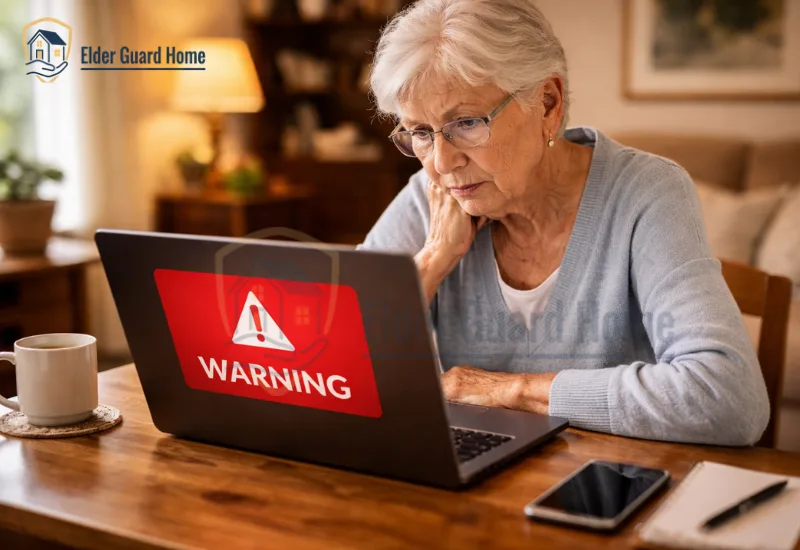
Imagine your mother is browsing online when a red alert fills her screen. It says her computer is infected. That alert shows the Microsoft logo. It plays an alarm sound.
A phone number flashes at the bottom. She calls it — and within 30 minutes, a scammer has full access to her bank account. This is exactly how tech support scams targeting seniors work in 2026, and it is happening every single day across America.
This guide will show you every warning sign, every scammer tactic, and every step you can take right now to protect the people you love.
What Are Tech Support Scams?
A tech support scam is fraud involving a fake computer, device, software, or account problem.
The scammer pretends to provide legitimate technical assistance.
They may claim to represent Microsoft, Apple, an internet provider, or another technology company.
Some scammers contact victims directly.
Others create fake error messages that encourage people to call them.
The FTC has identified tech support scams as a significant source of reported losses among older adults. In 2024, adults age 60 and older reported $159 million in losses from tech support scams.
The FTC also reported that adults age 60 and older were more than five times as likely as adults ages 18–59 to report losing money to a tech support scam in 2024.
These figures represent reported losses.
They should not be treated as the total amount lost to these scams.
How Do These Scams Actually Target Seniors?
Scammers use several contact methods.
The approach can change, but the pressure tactics are often similar.
The Fake Pop-Up Warning
A fake pop-up can make a normal webpage appear to be a serious computer emergency.
The warning may claim that the device has a virus, security problem, or compromised account.
Its purpose is to make the user contact the scammer before verifying the claim independently.
For a detailed guide, see our article on fake virus warnings on computers and what seniors should do when one appears.
If a suspicious warning displays a support number, do not call it.
For Microsoft-specific warning signs and response steps, see our guide on how to help an elderly parent recognize a fake Microsoft security alert.
The Unexpected Tech Support Call
A scammer may call and claim to work for a technology company.
The caller may say that your computer has been infected.
They may claim that your internet connection has been compromised.
They may also say that your account needs immediate verification.
The caller may sound calm and professional.
That does not make the call legitimate.
Microsoft specifically advises consumers to be cautious about unsolicited technical support calls.
Unexpected tech support calls can sound convincing, but several warning signs can reveal the scam. Learn how to spot fake tech support calls and what to do when an unexpected caller claims your computer has a problem.
If you did not request support, do not trust the caller automatically.
Seniors and caregivers should also recognize the warning signs discussed in our guide to Medicare scam phone calls, where callers may use urgency, impersonation, and requests for personal information.
The Remote Access Request
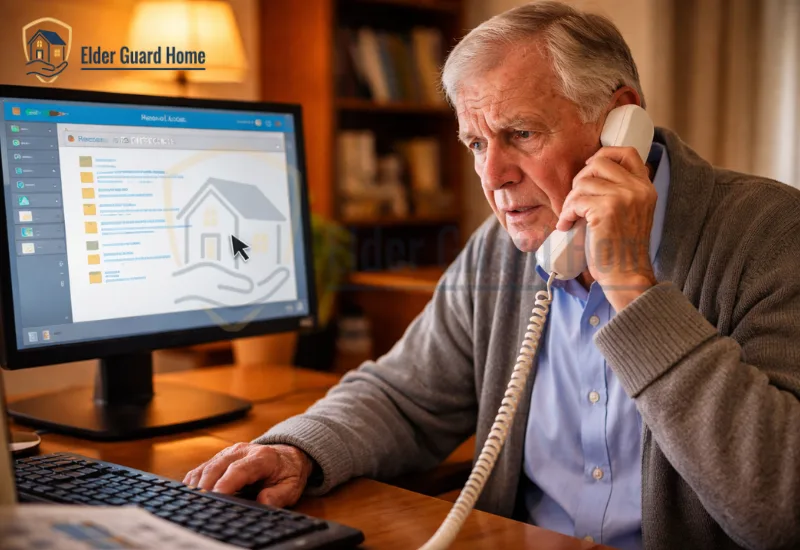
Remote access can become dangerous when a stranger requests it unexpectedly.
The scammer may ask you to install remote-support software.
They may then claim they need access to diagnose the problem.
Depending on the software and permissions, remote access can give the scammer significant control.
They may view information or install unwanted software.
Microsoft warns that scammers can use remote access to steal information or install malware.
Never give remote access to an unexpected caller.
If you need technical help, contact the company independently.
The Payment Demand
After gaining trust, the scammer may request payment.
They may claim that payment is required to repair the computer.
They may also claim that a security subscription must be renewed.
Payment requests can involve cards, bank transfers, gift cards, cryptocurrency, or money-transfer services.
Gift cards deserve special attention because scammers may pressure seniors to buy cards and share the numbers or PINs. Learn what to do after a tech support scam gift card payment, including how to preserve evidence, contact the card issuer, and report the scam.
The FTC has specifically identified payment methods that can be difficult to reverse as common elements of tech support scams.
A legitimate-looking payment request does not prove that the caller is legitimate.
If your parent has already sent money to a scammer, act quickly and document the payment details. Our guide explains what to do if an elderly parent gave money to a scammer, including the steps to take after the payment.
What Are the Warning Signs of a Tech Support Scam?
Several warning signs can appear together.
However, one strong warning sign can justify ending the interaction.
Someone Contacts You First
You did not request technical support.
Then someone suddenly claims that your computer has a serious problem.
That unexpected contact should make you stop.
The Message Creates Fear
The warning may mention viruses, hackers, stolen information, or account closure.
The scammer wants you worried.
Fear can make people act before checking the claim.
The Message Demands Immediate Action
Scammers often use words such as:
- Urgent
- Immediate action required
- Your computer is infected
- Call now
- Your account is at risk
- Do not turn off your computer
- Your information is being stolen
Legitimate problems can require attention.
However, pressure should never replace independent verification.
A Phone Number Appears in a Computer Warning
This is one of the clearest warning signs.
Do not call the number shown in the warning.
Microsoft states that genuine Microsoft error messages do not include phone numbers.
Someone Requests Remote Access
A stranger may ask you to install software.
They may say the software lets them inspect your computer.
That request is a serious warning sign when the contact was unsolicited.
The Caller Requests Passwords or Security Codes
Never provide passwords or verification codes to an unexpected caller.
A scammer may use those details to access other accounts.
The request can also indicate that the conversation has moved beyond a fake repair.
The Scammer Requests an Unusual Payment
Gift cards, cryptocurrency, wire transfers, and other hard-to-reverse methods should raise concern.
Do not continue simply because the caller sounds professional.
The Caller Claims to Be From a Trusted Company
Scammers may impersonate well-known technology companies.
The company name alone does not prove the contact is genuine.
Verify the organization independently.
The Scammer Does Not Want You to Verify the Story
A scammer may tell you not to hang up.
They may discourage you from calling your family.
They may also claim that another person cannot help.
That behavior is designed to keep control of the conversation.
What Should You Do When a Tech Support Scam Appears?
The safest response is to stop the interaction.
Do not try to prove that the caller is a scammer.
You do not need to argue with them.
Do Not Call the Number on the Screen
Never use a phone number supplied by an unexpected warning, caller, email, or message.
Scammers control the contact information they provide.
Instead, find the organization’s official website independently and use its published support information.
Do Not Give Remote Access
Do not install software because an unexpected caller tells you to.
Do not read remote-session codes to a stranger.
Do not allow someone to control the computer remotely.
If you already allowed access, follow the incident-response steps later in this guide.
Do Not Provide Passwords or Security Codes
Never give an unexpected caller your password.
Do not provide a one-time verification code.
Do not share banking credentials.
Do not read private information from your computer screen.
Verify the Problem Independently
If you believe there may be a genuine computer problem, verify it separately.
Use the company’s official website.
Use a known support number.
Or ask a trusted family member or qualified technician.
Never use contact information supplied by the suspicious message.
Ask a Trusted Person for Help
Older adults should never feel embarrassed about asking for help.
A second person can provide time and perspective.
That can make it easier to recognize pressure tactics.
Create a family rule before a scam happens.
For example:
“If a computer problem appears suddenly, stop and call us first.”
How Can You Protect an Elderly Parent From Tech Support Scams?
Prevention works best when the rules are simple.
Your parent does not need to memorize every scam.
They need a reliable response when something feels urgent.
Create a Family Verification Rule
Choose one simple rule for unexpected technology problems.
For example:
Stop the conversation and contact a trusted family member.
Make the rule apply to phone calls, pop-ups, emails, and messages.
The goal is to create time for verification.
Teach the Unexpected Contact Rule
Explain that legitimate companies can be contacted independently.
Your parent does not need to trust an unexpected caller.
They can hang up.
They can close the browser.
They can call the company later through an official channel.
Keep Important Contact Information Available
Create a short list of trusted contacts.
Include a family member or caregiver.
Include important financial institutions.
Include legitimate technology-support contacts when appropriate.
Store the information somewhere your parent can access easily.
Keep Devices and Software Updated
Regular updates can improve security.
Use supported operating systems and browsers.
Download software through reputable sources.
Avoid installing programs because an unexpected caller recommends them.
Microsoft recommends downloading software from official sources and warns about software from untrusted third-party sites.
Make It Easy to Ask for Help
Some older adults may worry about appearing inexperienced.
That can make them hesitate.
Tell your parent that reporting a suspicious message is always acceptable.
Do not make them feel foolish for asking.
A simple family rule can help:
“You will never get in trouble for asking us before you click.”
What If a Scammer Already Got Remote Access?
Remote access changes the situation because the scammer may have viewed information, accessed accounts, or installed software.
Stop communicating with the scammer and secure any accounts that may have been exposed.
If financial information was involved, contact the relevant financial institution promptly.
Learn what to do if scammer got remote access, including the key steps to take to secure your device, accounts, and personal information.
What If an Elderly Parent Already Paid a Scammer?
Act quickly, but stay calm.
First, stop additional communication.
If money has already been sent, see our guide on what to do after an elderly parent gives money to a scammer.
Do not send another payment.
Then contact the company or financial institution used to send the money.
Ask what reversal, recall, dispute, freeze, or refund options may be available.
The available options depend on the payment method and circumstances.
Save receipts, transaction numbers, messages, phone numbers, and screenshots.
You should also report the scam.
It covers bank transfers, cards, payment apps, wires, gift cards, cryptocurrency, checks, and other payment methods.
If your parent has already been targeted, our guide explains what to do if your elderly parent is being scammed online, including how to protect accounts, report the scam, and reduce further harm.
How Should You Talk With an Elderly Parent About These Scams?
Start with safety instead of blame.
Scammers deliberately create pressure.
Your parent may feel embarrassed after realizing what happened.
That embarrassment can make future reporting less likely.
Avoid Blaming Your Parent
Do not ask why they believed the scammer.
Do not describe them as careless.
Focus on what happened.
Then focus on what can be done next.
Ask What Happened
Use calm, specific questions.
Ask:
- Who contacted you?
- How did they contact you?
- What did they claim?
- What did they ask you to do?
- Did you install anything?
- Did you give them remote access?
- Did you provide a password?
- Did you provide a verification code?
- Did you send money?
- Did they contact you again?
Write down the answers.
Do not interrupt or criticize.
The goal is to understand the full situation.
Create a Simple Family Rule
Tell your parent that suspicious technology problems can always wait.
The family can use three steps:
STOP → VERIFY → DISCUSS
STOP: Do not click, call, pay, or install anything.
VERIFY: Contact the claimed organization independently.
DISCUSS: Speak with a trusted person before taking action.
This rule does not remove independence.
It creates a safety pause.
Common Tech Support Scam Examples
Tech support scams can take different forms.
The following examples share the same basic pattern.
Fake Virus Warning
A website claims that the computer is infected.
The warning provides a support number.
The victim is told to call immediately.
Fake Microsoft Support Call
The caller claims to work for Microsoft.
They say the computer has a security problem.
They request remote access or payment.
Fake Antivirus Renewal
A message claims that an antivirus subscription is expiring.
The victim is asked to call or provide payment details.
Refund or Overpayment Scam
The scammer claims that a refund was issued incorrectly.
They then request remote access or a payment.
Fake Internet Provider Support
The caller claims that the internet connection has been compromised.
They offer to repair it remotely.
The real goal may be access, information, or payment.
Fake Computer Repair Advertisement
A deceptive advertisement appears to offer technical support.
The advertisement may use the name of a familiar company.
The victim calls the number and reaches the scammer.
What Not to Do During a Tech Support Scam
Do not:
- Call the number in a suspicious pop-up.
- Give an unexpected caller remote access.
- Install software at the caller’s request.
- Provide passwords.
- Provide one-time verification codes.
- Share banking information.
- Send gift cards.
- Send cryptocurrency.
- Transfer money because someone creates urgency.
- Allow the caller to keep you from contacting family.
- Assume caller ID proves identity.
- Use contact information supplied by the suspicious message.
- Pay someone who promises to recover lost money.
When in doubt, stop the interaction and verify independently.
Frequently Asked Questions
Final Thoughts
Tech support scams targeting seniors work by creating fear before verification.
The scammer wants the victim to act quickly.
That may mean calling a number, installing software, giving remote access, or sending money.
The safest response is simple.
Stop. Do not call. Do not click. Do not give remote access. Verify independently.
Families can make this easier by creating a verification rule before a scam happens.
If something suddenly appears on the computer, your parent should know whom to call.
If money was already sent, contact the payment provider immediately.
If remote access was given, treat the device and exposed accounts as potentially compromised.
Most importantly, make it safe for your parent to tell you what happened.
A calm conversation can prevent a second loss.
Sources
These are the sources I used to verify the factual claims and current statistics: